
About

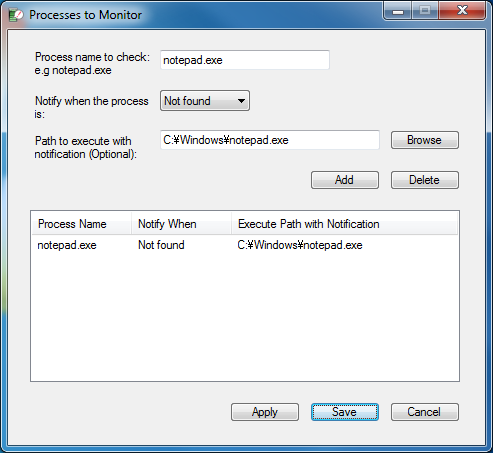
This program sends notification email when a specified process starts/closes/is found/is not found. This will be useful when there is a PC which cannot be watched all the time. Moreover, it can be used to notify you when the machine is started or send desktop screenshots via E-mail. It is portable and does not require to run an installer.
Requirements
Windows XP or later.
License
Freeware
Usage
Sponsored Links
Download

Awards
  |
Support
If you find a bug in the program, please report it from the bug report page. For a feature request or a question on how to operate the program, please comment below.

I’m having an issue where the program has a problem sending an email, but since the issue doesn’t seem to have a log I can’t tell what’s going on with it. I’ve tried using my own SMTP and not – How can I fix the problem?
Great idea for a program by the way! It’s so simple, and if there are others similar to it I haven’t found them.
Great app! However I get a notification ‘There was a problem sending email. Any idea what this could be?
Running Windows Server 2016 Standard
Hi,
I don’t want this program to be closed by any users, like anyone can right-click on tray icon and exit from it. So is it possible to do so? Like only administrator can close it, not everyone.. Please guide me
Thanks a lot
Hi,
I have found a way to restrict others from closing it, but there is a little problem. I am sure you can help me.
I can not permanently modify the scan interval time, whenever I set my time, after restarting the program it goes to default time, which is 60 minutes :(. How can I make this scan interval permanent???
Thanks
This is awesome! EXACTLY what I was looking for! Thanks <3
Hi,
Thanks for this simple and very useful application. I have noticed that the screenshot is always being sent irrespective of the option selected. Also i need to include multiple recipients but the application is sending mail to the first one only.
It would be great if a new version come out soon with those fixes.
Thank you once again for such a great utility.
Hey, this app works great! Are you planning in releasing a new version soon?
How about allowing to add arguments to the “Path to execute”
Something like C:\test\test.bat Argument1 Argument2
hello, i just started using the program, is there a way to get email ONLY when the procces is closed and not every time the scan starts? i keep getting emails every time scan is starting… i choose to notify when proccess is closed, so can i get email only when its closed and not also when its still open?
Just make sure the added item in the Processes to Monitor setting does not say “Found” or “Not Found” but “Closed” in the “Notify When” option. The app should send an email only when the specified process is closed.
I suspect you have added some other processes and the program is finding ones that you are not talking about.
Michael:
This is an excellent program which I use often. I’m having a bit of trouble, though. The 64-bit version hangs after about 4 days of continuous operation. The OS is Windows 7 64-bit, and I have it sending me desktop snapshots about once an hour. Would a screen saver or power save cause Process Notifier to hang?
Thanks for your help,
Rich
Hi Rich,
It could. But I have no idea. I would try tuning off the machine to the stand-by mode and going back the desktop and see what happens.
[EDITED]
Hi Michael,
thanks for this great app, exactly what I was looking for!
The only thing is, I keep getting emails with a screenshot attached which option I turned off at the email settings. I don’t really want to receive the screenshots (I am on win64 using your latest version)
And a little question: what is the difference between apply and save? isnt that the same?
Cheers.
Max
Hi,
That is a known bug and I haven’t found the time to fix it. You may try one of the lesser versions that may not have that bug. However, it may not send E-mail properly when the interval is set too short.
The difference is that Apply will save the current set values and Save will do the same plus close the window. If it does not close the window, it should be a bug.
hi, after searching much enough on the web, I have found your solution to be informed when a process is closed in my computer and server. Really good software, thank you so much